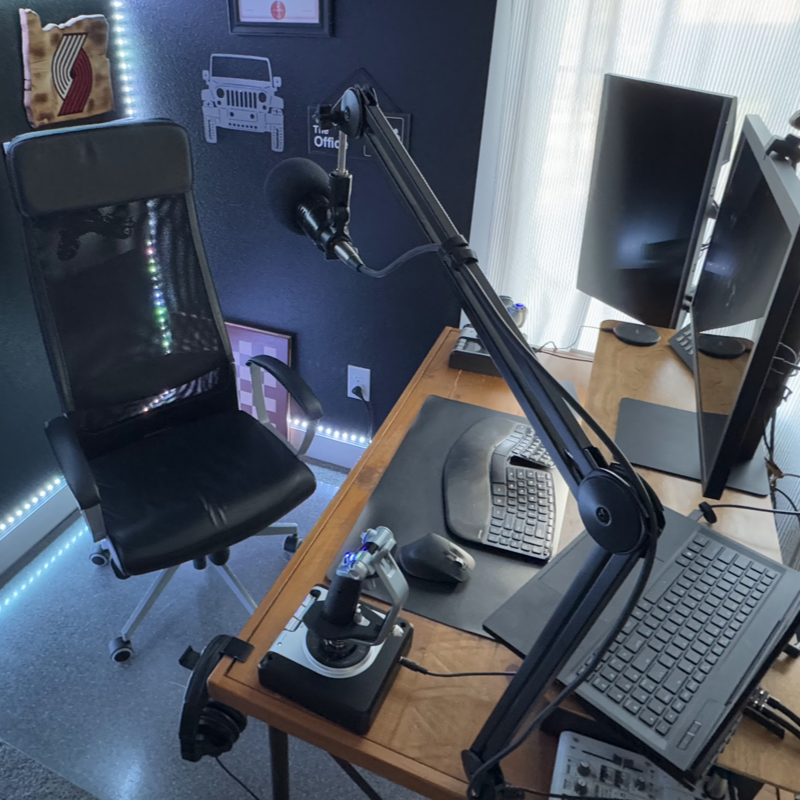
This is the podcasting setup I use and recommend. It's also what we use at Infinite Red for our podcasting and video call meetings in general.
Equipment List
-
Mixer:
Yamaha AG03 3-Channel Mixer / 1 Microphone
($150)
This mixer is great and has a lot of features. But I also just set it up once and haven't touched it in ages. Only time it is a problem is if a kid comes by and plays with the settings.
My current settings for the AG 03 mixer are:
- Slider: right on the thick line
- Gain knob: 85%
- Gain button: low (pressed in)
- Computer audio knob: 88%
- Guitar audio knob: 0% (unused)
- +48v and PAD buttons: off
- Monitor Speakers knob: 0% (unused)
- Monitor Headphones knob: 28%
- Comp / EQ button: off*
- Effect button: off
*However, you will PROBABLY want your Comp / EQ button to be on. I turn it off because our editors have their own software compressors and EQ settings and don't like my hardware ones messing with it.
-
Microphone:
Electro-Voice RE320 Large Diaphragm Dynamic Vocal Microphone
($200 used, $300 new)
We've had good luck with used mics, so I'd buy a used one off of eBay or a renewed one from Amazon. Dynamic mics tend to work better than condenser mics in normal office environments (condenser mics work well in sound booths).
-
Headphones:
Sennheiser Pro Audio HD280PRO Headphone
($80-100)
These aren't high-end headphones known for their wonderful music listening experience, but at under $100 that makes sense. What they are really good at is low bleed-through (where you hear in your mic what you hear in your headphones, in other words you pick up what the other people are saying in your mic — these are good at preventing that).
-
Microphone Arm Stand:
InnoGear Microphone Arm Stand
($50-60)
This one is better than the Rode which is $100. Microphone arm stands are great in that you don't get the bumps/thumps as you hit your desk while talking, and they smoothly swing out of the way when not podcasting.
-
Shock Mount:
Microphone Shock Mount
($12-16)
Reduces arm vibration getting to the mic.
-
XLR Cable:
Hosa HMIC-010 Pro Microphone Cable
($19-30)
You'll need just one cable, to go from your mic to the mixer. You can get 5 feet or 10 feet, whatever you need. Or get both a 5 and 10 foot cable, so you have options.
Total Cost
All in, you can get this setup for about $400 depending on whether you buy new or used equipment. This is a professional-quality setup that will last you years.
Disclosure: Some of the links on this page are affiliate links. I may earn a small commission if you purchase through them, at no extra cost to you.